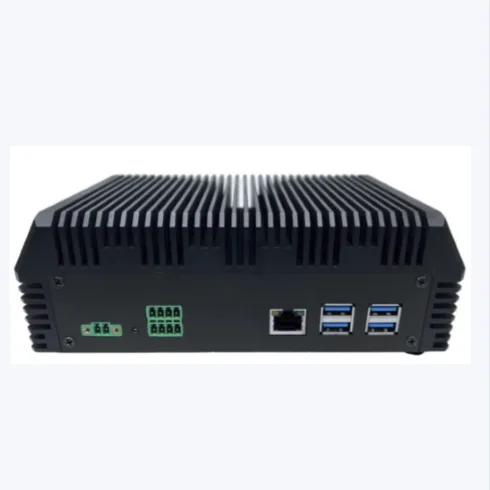
Sibox
Edge AI box transforming existing cameras into real-time operational insights.
AI Compute
48 TOPS INT8 (Dual eNPU)
Camera Streams
16+ Cameras / Box (1080p30)
Power & Temp
16 W | −20°C to 60°C
Memory & Storage
16+128 GB (SSD up to 2 TB)
Cellular Option
4G/LTE (nano-SIM slot)
Dimensions
195 × 114 × 80 mm
Install Once, Subscribe Monthly
Contact for pricing
1,000,000 – 1,500,000 VND/camera/month (>10 cams) · 24/7 VMS/Cloud & 24–48h Box Swap
01 · REALITY & INVESTMENT BARRIERS
Cameras Record 24/7, Nobody Can Watch Them All
Traditional CCTV only serves as post-incident playback, while conventional AI upgrades demand costly hardware replacements.
4 Pain Points of Passive CCTV Monitoring
- Late Detection:Incidents are usually discovered only after someone reports them; cameras are only used to rewind footage afterward.
- Overloaded Operators:A single security guard cannot continuously track dozens of camera feeds throughout an entire shift.
- Overwritten Evidence:By the time an investigation is needed, the video clip has often exceeded the NVR retention period.
- Zero Management Metrics:Visitor counts, queue waiting times, and repeated SOP violations remain unmeasured.
Why Conventional Camera AI Costs Too Much
- Replacing Working Cameras:Existing functional cameras are discarded for specialized AI cameras (~16,000,000 VND / camera).
- Expensive GPU Servers:Face search and people analytics typically require heavy centralized GPU server infrastructure.
- Perpetual Cloud Fees:Cloud video streaming and analysis charge per camera every month (~230,000 VND/cam/month) forever.
- No Internet, No Alerts:When processing depends on Cloud or remote servers, any network drop blinds the entire alerting system.
02 · 05 KEY DIFFERENTIATORS
What Makes Sibox Different from Ordinary AI Boxes
Plug one compact box into your existing LAN camera network — AI analyzes video on-site and sends alerts with photo and clip evidence.
No External GPU Needed
AI runs directly on the integrated Qualcomm Dual eNPU V3 delivering up to 48 TOPS INT8 at only 16 W power consumption.
No Controller Required
Scale effortlessly by adding more Sibox nodes; the software automatically balances camera stream loads across boxes.
Works Offline When Internet Drops
Inference happens 100% on-premise; events queue locally and automatically synchronize once network connectivity returns.
Single Perception, Multiple Rules
A shared perception layer runs once per frame; add new business behavior rules purely through configuration.
Reuses Existing Cameras
Read-only RTSP stream ingestion with zero interference — your existing cameras and NVR recorders keep recording as usual.
03 · HOW SIBOX WORKS
From Video Frame to Actionable Alert in Seconds
Sends structured metadata, snapshot, and clip reference instead of raw 24/7 video — saving WAN bandwidth while preserving full evidence.
Camera / NVR
Uses existing RTSP cameras. NVR continues recording 24/7 without modification.
5-Stage On-Device Pipeline
01 Ingest RTSP → 02 Perception & Tracking → 03 Quality Check → 04 Behavior Rules → 05 Event + Evidence
VMS | Mobile | Kiba
Event center, role-based access control, audit trail, and automatic task dispatch via Kiba.
Branch / Ward → Province IOC
Aggregates approved operational events across sites via Adaptive Integration Layer.
04 · BUSINESS BEHAVIOR LIBRARY
21 Pre-Built Workplace Behaviors Across 05 Groups + Smart Parking, Gate LPR & 3D Digital Twin
Applicable across Public Administration, Banking Branches, F&B, Retail, Corporate Offices, and Industrial Facilities.
Staff Conduct & Compliance
- Staff Absent from Post:Counter, desk, or gate left unattended beyond configured duration.
- Unauthorized Staff Gathering:Excessive staff count congregating in a zone past time threshold.
- Uniform / PPE Violation:Detects missing mandatory uniform, helmet, or safety vest.
- Improper Sitting / Lying Down:Detects sitting or lying posture in restricted areas during work hours.
Operational SOP Compliance
- Service Counter Unattended Too Long:Cashier or transaction counter without staff during operating hours.
- Off-Schedule Door Open / Close:Door opened or closed outside configured time schedule.
- Inspection Zone Neglected:Critical area not visited by patrol/inspection staff within required interval.
Customer Service Quality
- Customer Waiting Too Long at Counter:Visitor waits in counter zone longer than maximum SLA time.
- Queue Length Exceeded:Number of people in queue exceeds threshold for the service area.
- Occupied Table Unserved:Seated guests not approached by staff within target response time.
- Service Zone Overcrowded:Crowd density in lobby or service area exceeds safe capacity.
Business & Traffic Analytics
- Zone Utilization Rate:Measures occupancy levels per zone over time to identify hot and cold areas.
- Peak Hour Identification:Tracks hourly and weekly visitor peaks for staffing optimization.
- Visitor In / Out Counting:Bidirectional line-crossing counts aggregated by hour and day.
- Average Dwell Time:Calculates how long customers stay in a branch, store, or zone.
- Table Occupancy Ratio:Real-time ratio of occupied tables vs total tables.
- Movement Heatmap:Visualizes high-traffic paths and stopping points.
Safety & Incident Detection
- Restricted Zone Intrusion:Person enters polygon-defined restricted zone during unauthorized hours.
- Fall Detection:Detects person falling to the floor and remaining motionless, sending instant clip evidence.
- Camera Blinded / Signal Loss:Alerts when camera view is obstructed or video feed drops.
- Camera Tampering / Angle Shift:Compares against reference frame to detect camera rotation or displacement.
Smart Parking, Gate LPR & 3D Building Twin
- Misaligned / Double Parking:Detects angle deviation θ ≥ 12°, line overlap ≥ 20% held ≥ 60s (≥90% precision, ≥85% recall).
- Automated Gate LPR Logging:Reads 1- and 2-line license plates (≥98% capture, ≥95% day, ≥90% night, ≤2s to VMS).
- Multi-Camera Watchlist & Trace:Cross-camera timeline tracking (≥95% accuracy, ≤3s alert, non-matched faces discarded immediately).
- 3D Digital Twin Building Map:3D spatial model from existing cameras maintaining person IDs across floors & rooms.
IN ACTION
Watch Sibox Real-World Demo Video
Live camera feed running multiple parallel behavior rules on the on-premise Sibox management console.
05 · SOLUTION COMPARISON
Same "Camera AI" Goal — Fundamentally Different Architecture
How Sibox compares against conventional Camera AI, centralized GPU servers, and proprietary AI NVRs.
| Criteria | SIBOX (Naiscorp) | Telecom Camera AI | Centralized Server AI | Proprietary AI NVR |
|---|---|---|---|---|
| Existing Cameras | Reused via RTSP(no replacement) | Replace with new AI cameras (~16M VND/cam) | Reused, processed on central server | Prioritizes same-brand cameras |
| Processing Infrastructure | 48 TOPS NPU inside box, no discrete GPU | Cloud (Option 1) or GPU Server (Option 2) | Centralized GPU server cluster | NPU inside recorder |
| When Internet Drops | Keeps detecting locally, auto-syncs later | Depends on cloud connectivity | Depends on deployment topology | Runs locally |
| Business Rules | 26 pre-built behaviors + no-code custom rules | People count, wait time, face recognition | Focused primarily on face recognition | Fixed vendor algorithm set |
| Beyond Alerts | 3D Digital Twin, Kiba AI Agent, Service Robots | VMS + Cloud dashboard | Central management platform | Closed vendor ecosystem |
06 · APPENDIX A2 SPECIFICATIONS
Sibox Hardware Technical Specifications
Complete hardware parameters according to official engineering specifications.
| AI Accelerator | Qualcomm Dual eNPU V3; 48 TOPS INT8 / 12 TFLOPS FP16 |
|---|---|
| CPU & Operating System | 6-core processor / Android, Ubuntu, Linux |
| Memory & Expansion | 16 GB RAM + 128 GB Storage; M.2 NVMe SSD (≤ 2 TB); MicroSD |
| Rear Interfaces & I/O | 1 × RJ45 1 Gbps LAN; 4 × USB 3.0; 2 DI / 2 DO; DisplayPort; Optional 4G/LTE (nano-SIM) |
| Power & Environment | 12 V DC, 16 W; −20°C to 60°C operating temperature; 5–95% RH |
| Video Decoding | 16 × 1080p30 or 32 × 720p30 (H.264 / H.265 / VP9) |
| Dimensions (L×W×H) | 195 × 114 × 80 mm |
| Data Security & Privacy | Read-only RTSP; local-first inference; default non-facial mode; HTTPS + mTLS + short-lived signed URLs |
07 · SERVICE PACKAGES & INVESTMENT
Install Once, Subscribe to AI Monthly
Transparent two-phase investment model with 24/7 VMS/Cloud support, FPT Cloud Level-4 security storage, and 24–48h hardware replacement.
Initial Setup & Handover
Billed once based on actual site survey and project scope — zero camera replacement required.
- 01. Site survey, RTSP & camera angle assessment
- 02. Sibox installation & existing LAN/NVR link
- 03. AI rule calibration, ROI zones & Cloud link
- 04. Operator training & technology handover
15,000,000 VND / box / month
All-inclusive monthly AI processing subscription billed per Sibox unit for sites with under 10 cameras.
- Includes 24/7 VMS & Cloud technical support
- Hardware failure: new box swap within 24–48h
- Event storage on FPT Cloud (InfoSec Level 4)
- Optional Event Cloud: 150,000 VND/cam/month
1 – 1.5M VND / cam / month
Flexible per-camera monthly AI subscription for larger branches, headquarters, and multi-node deployments.
- 1,000,000 – 1,500,000 VND / camera / month
- Scale seamlessly: 01 Box (~10 cams), 02 Boxes (≤32 cams), 04 Boxes (≤64 cams)
- Optional Add-ons: Kiba AI Agent & 24/7 full video cloud
WORKMATE ECOSYSTEM
Related Products

Workmate · Orchestration
Kiba
Enterprise AI Agent for source-cited Q&A, task dispatch, and urgent Zalo alerts

Workmate · Interaction
Table Top
Desktop AI voice assistant robot bringing Kiba to every workstation
Category Overview
Workmate Suite
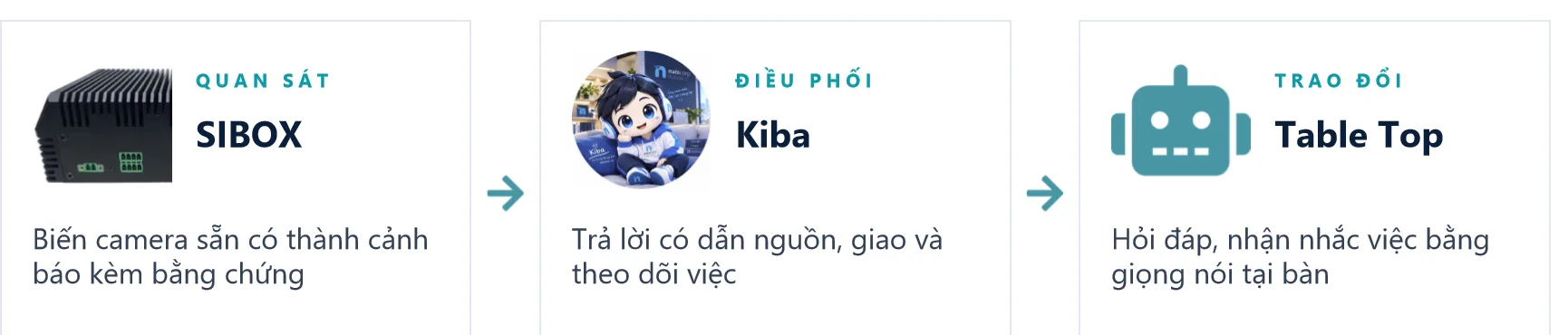
Complete Observe (Sibox) – Coordinate (Kiba) – Interact (Table Top) ecosystem